
On this page
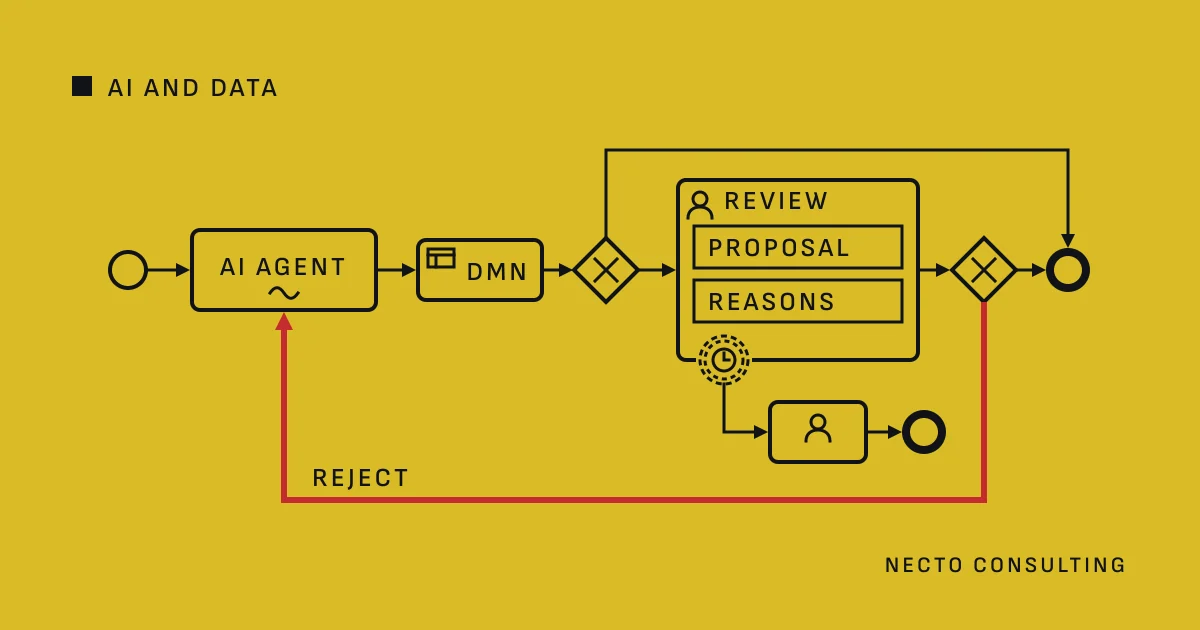
A person reviews an AI agent’s proposal in a user task that follows the agent’s step in the BPMN model. In Camunda 8, a DMN rule decides which cases reach that task, a boundary timer event escalates a review left waiting, and a rejection sends the case back to the agent with the reviewer’s comment. Operate and the audit log record who decided what.
Where the review sits in the process
#With the Camunda AI Agent connector, part of agentic orchestration from Camunda 8.8, a person can come in at three places:
- After the agent’s answer. The process routes the agent’s response to a user task before it continues. Camunda’s documentation calls this a response follow-up, and human-in-the-loop when the reviewer is a person.
- As a tool the agent calls. Inside the agent’s ad-hoc sub-process, a user task can be the tool the agent calls to ask for approval.
- In front of a tool. With the AI Agent Task implementation, the model can intercept the agent’s tool calls and put a human approval step before they run.
The first place fits most reviews. In the second, the agent itself decides whether to ask; the third suits a tool whose action is the risk, such as a payment. The wider pattern is in AI agents inside BPMN.
What the reviewer sees: the proposal and its reasons
#Set the agent’s response format to JSON: the connector then returns the parsed answer as responseJson in its result variable. A JSON schema, where the model provider supports one, describes the fields you expect: the proposal, the reasons for it and the sources the agent used. If the model returns no valid JSON, the connector throws an error.
The user task then shapes that answer for the reviewer:
- Input mappings copy the fields into local variables of the task, in the shape its form expects.
- The form binds each field by its key to a variable: it shows the value when the task opens and writes the reviewer’s entry back on submission.
- An output mapping passes on only the decision and the comment; without one, every submitted variable is merged into the process instance.
- The assignment names the reviewer or the group. Who may see and complete the task is set by user task authorization, not by candidate groups alone.
Which cases need a person: a DMN rule task
#Not every proposal needs a person, and the agent should not decide which one does. A business rule task after the agent evaluates a DMN decision by its decision ID and stores the result in its result variable. Its inputs are fields of the agent’s answer and of the case, such as an amount or a category.
Two settings decide how safe the rule is:
- The hit policy. The default, Unique, raises an incident when more than one rule matches. First takes the first matching rule, so the order of the rules becomes part of the policy.
- The default flow. The exclusive gateway after the rule task takes the first flow whose condition is true, and its default flow when none is. Make the review the default flow, and a case the rules do not cover goes to a person, not past one.
Camunda’s design guidance agrees: confidence levels help, but an agent should always have a deterministic path to a person.
A review left waiting: the boundary timer event
#A due date says when the review should be finished; a timer boundary event on the user task makes the process act when it is not. There are two kinds:
- Non-interrupting: the review stays open, and the timer starts a path beside it, such as a task for the team lead. A duration fires once; a cycle such as
R3/PT4Hfires up to three times, every four hours. - Interrupting: the timer ends the user task and moves the case on, for example to a second reviewer.
A timer also takes an expression, so the deadline can come from a variable the DMN decision set. Camunda never fires a timer early, but under load it can fire late.
When the reviewer rejects: the loop back to the agent
#The reviewer’s decision goes to an exclusive gateway after the user task:
- Approve: the process goes on with the agent’s proposal.
- Correct: it goes on with the reviewer’s version, and the record keeps both.
- Reject: the flow loops back to the agent with the reviewer’s comment as a follow-up request. To continue the same conversation, Camunda’s documentation says to align the agent context variable with the agent’s result variable.
Two rules keep the loop honest. A variable keeps only its latest value, so append each round to a list in the output mapping, with the append function of FEEL. And count the rounds: after the number you set, a person decides without the agent. The agent’s own step has a separate limit, the maximum number of model calls, 10 unless you set another.
What Operate and the audit log record
#For each process instance, Operate shows the diagram with the instance’s progress, an instance history of its elements and its variables: the agent’s answer, the rule’s result and the list of review rounds. It also lists each evaluated decision instance.
From Camunda 8.9, the audit log adds who assigned, unassigned, updated and completed each user task, and when. You read it in Operate’s operations log, in Tasklist and through the REST API. By default it tracks the operations of users, not of clients; that is a setting.
This history lives in secondary storage. On Self-Managed with the Helm chart, a retention policy, once enabled, deletes archived history older than a minimum age, 30 days unless you set another. Decide that period with whoever owns the audit, and export what must be kept longer.
What the EU AI Act says about human oversight
#Art. 14 of the EU AI Act requires high-risk AI systems to be designed so that natural persons can effectively oversee them while they are in use, which includes enabling those persons, as appropriate and proportionate, to disregard, override or reverse the system’s output, and Art. 26(2) requires deployers to assign that oversight to people with the necessary competence, training and authority. Under the AI Omnibus these rules apply to Annex III systems from 2 December 2027; whether your system is high-risk is for your legal team to decide, and AI compliance describes our technical and governance work beside it, which is not legal advice.
Starting with one review step
#Start with one decision that a person already makes by reading documents, with a clear owner, and add the agent and its review there. Let a type of case skip the review only when the record of corrections supports it.
The Camunda behaviour in this article was checked on 19 October 2026 in Camunda’s documentation for 8.8, 8.9 and 8.10. How we build agents into governed processes is on the page AI agentic development.
Questions
Where does a person review an AI agent’s output in a Camunda process?
A person reviews it in a user task after the agent’s step, before the process acts on the proposal. A user task can also be a tool the agent calls, or an approval step in front of one of the agent’s tools.
How does the process decide which cases need a human review?
A business rule task decides it with a DMN decision, from fields of the agent’s answer and of the case. The exclusive gateway after it routes on the result, and with the review as its default flow, a case the rules do not cover goes to a person.
What happens when nobody reviews the task in time?
A timer boundary event on the user task acts when the review waits too long. A non-interrupting timer keeps the review open and starts an escalation beside it; an interrupting timer ends the task and moves the case on.
What does Camunda record about each review for an audit?
Camunda records the progress, the variables and the user task operations of each review. Operate shows each instance’s progress and variables, and from Camunda 8.9 the audit log adds who assigned, updated and completed each user task, and when.
Sources
- AI Agent connector, Camunda
- AI Agent Sub-process connector, Camunda
- 8.8 Release notes, Camunda
- Design and architecture, Camunda
- User tasks, Camunda
- Data binding, Camunda
- User task authorization, Camunda
- Variables, Camunda
- List functions, Camunda
- Business rule tasks, Camunda
- Hit policy, Camunda
- Exclusive gateway, Camunda
- Timer events, Camunda
- Get familiar with Operate, Camunda
- Audit log, Camunda
- Recorded operations, Camunda
- Audit operations, Camunda
- Audit task history, Camunda
- 8.9 Release notes, Camunda
- Configure data retention, Camunda
- Regulation (EU) 2024/1689 laying down harmonised rules on artificial intelligence (Artificial Intelligence Act), EUR-Lex
- Regulation (EU) 2026/1744 as regards the simplification of the implementation of harmonised rules on artificial intelligence (Digital Omnibus on AI), EUR-Lex
