
On this page
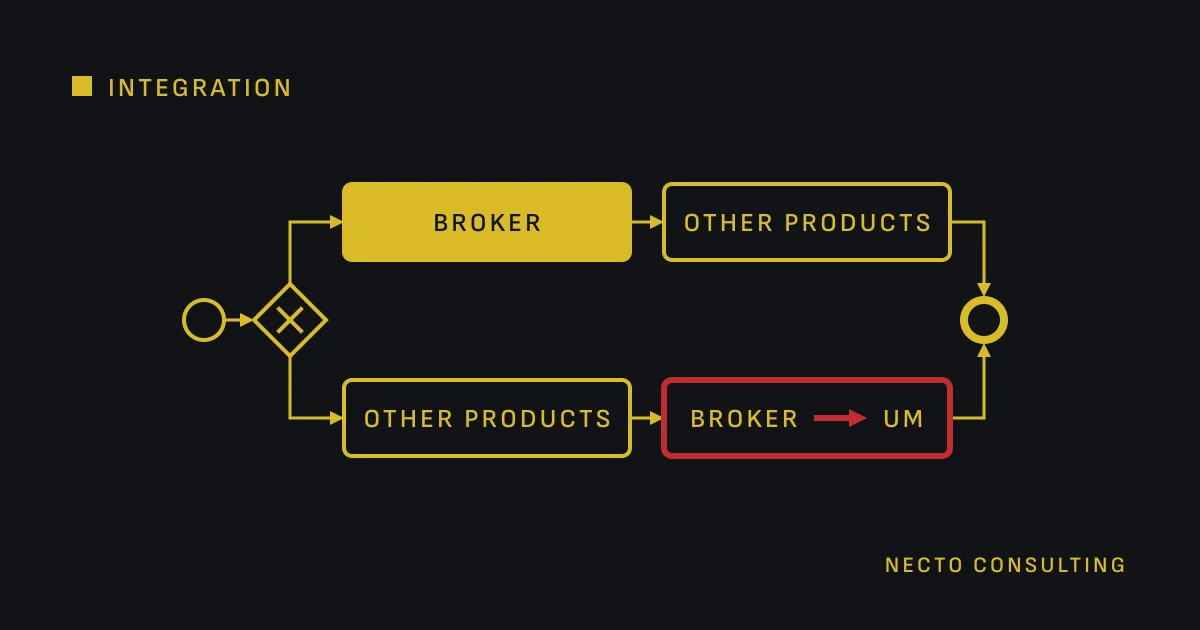
In an upgrade of IBM webMethods 10.x to 11.1 or 12.1, webMethods Broker can stay or move to Universal Messaging (UM). IBM’s upgrade guides allow both and say that Broker has been deprecated. The choice sets the order: to stay, upgrade Broker first and then the other products; to move, upgrade the other products first and then migrate Broker.
What IBM’s upgrade guides say about Broker
#IBM’s upgrade guides for 11.1 and 12.1 say three things about Broker, on their page about upgrades covered in other guides.
- Broker has been deprecated.
- To stay on Broker, upgrade Broker first, with IBM’s guide to installing and upgrading Broker, and then the other products.
- To move to Universal Messaging, upgrade the other products first, then migrate Broker with IBM’s guide “Migrating from IBM webMethods Broker to IBM webMethods Universal Messaging”.
Deprecated does not mean removed: IBM’s documentation includes Broker releases 11.1 and 12.1. IBM’s deprecation note dates the deprecation to webMethods 10.2, and says that an estate that keeps Broker stays fully supported only until Broker’s announced end-of-life dates.
What decides between staying on Broker and moving
#Four questions decide it. Answer them from the inventory of the estate, which the upgrade plan for IBM webMethods 10.x puts before any choice of target.
- How long Broker stays supported for you. Find the end-of-life dates announced for your Broker release before you plan to stay on it.
- How the estate uses Broker. List what runs through it: publishable document types and the Integration Server triggers that subscribe to them, JMS destinations, territories and gateways, and every application that calls Broker through its own client API. Each has its own route to Universal Messaging.
- Which target you choose. Broker 12.1 has a new storage format with a 4096-byte block size. IBM’s Broker guide says that storage from earlier versions is not compatible and must be created new. An upgrade of Broker to 12.1 therefore means an export and import of the Broker configuration.
- What the project can carry. A version upgrade and a messaging move in one cutover put two changes into one night. Staying on Broker for the upgrade and moving afterwards splits them.
The order of the upgrade if you stay on Broker
#- Upgrade Broker. IBM’s Broker guide for each target sets out the cases. The old Broker keeps running on its own machine, and the new release’s clients point to it. A new Broker on the same or a compatible machine uses the old storage. On an incompatible machine, you create new storage and move the configuration with Broker’s export and import utilities. For 12.1, the new storage format means new storage.
- Upgrade the other products, in the exact order in which IBM’s upgrade guide presents its tasks, because the products depend on each other.
On a different machine, IBM advises keeping the old host name, so the territory and cluster setup, the connection aliases and Integration Server’s messaging settings stay as they are. IBM also notes that in webMethods 10.7 and 10.11 the Broker release number is still 10.5.
The order of the upgrade if you move to Universal Messaging
#- Upgrade the other products, Integration Server among them, while Broker stays in place. IBM’s Broker guide covers this case: the old Broker keeps running on its own machine, and the new release’s clients point to it. For 11.1 the guide names Broker 9.6 or higher, for 12.1 Broker 10.5 or higher.
- Migrate Broker to Universal Messaging, with IBM’s migration guide.
In Integration Server, the built-in service migrateDocTypesTriggersToUM, in the pub.utils.messaging folder, makes the switch. It moves the publishable document types to a Universal Messaging connection alias and sets their encoding to protocol buffers. It also synchronises them with the provider and converts the filters of the triggers that subscribe to them. IBM’s usage notes set its conditions:
- Integration Server must be connected to the Broker that holds the document types and the trigger subscriptions. The document types must be synchronised with Broker first.
- If the default messaging connection alias points to Broker, make a Universal Messaging alias the default before you run the service.
- Add at least two threads to the server thread pool for each trigger you migrate.
- Run the service in report-only mode first, which is its default, then for real with package backups on. Restoring a backup is the only way to undo its changes.
- Migrate all the document types a trigger subscribes to in one run. A trigger left with document types on two aliases is invalid and is saved disabled.
What maps to what when Broker moves to Universal Messaging
#- A publishable document type has a Broker document type on Broker and a channel on Universal Messaging.
- A webMethods messaging trigger becomes a durable subscriber, which Integration Server sets up: a serial durable for serial processing, a shared durable for concurrent processing.
- The connection alias: an Integration Server has at most one alias for a Broker, and it can have several for Universal Messaging.
- Territories and gateways: IBM’s release notes for Universal Messaging 10.0 describe a utility that reads the Broker gateway configuration and sets up the same remote joins.
- JMS: IBM’s release notes for Universal Messaging 9.9 describe a migration utility for JMS that can generate the JNDI destination entries.
IBM’s descriptions of these tools do not mention applications written against Broker’s own Java or C client API. List those applications, and find their path in the migration guide before you size the work.
What to test before the switch to Universal Messaging
#Test on a copy of production, with the same document types, triggers and volumes.
- The triggers. Check that no trigger was saved disabled. A trigger listed with a warning keeps its original filter as a local filter, applied after the message arrives, beside the part that moved to Universal Messaging: test its results and its load.
- Encoding and filters. With protocol buffers, a provider filter can test only the message body; with IData, only the
_propertiesheader. A document type with a Document Reference field named “group” must use IData. - Local publishing. A document type on a Universal Messaging alias cannot be published locally. Test every flow that relied on it.
- Durable subscriptions. A later change to a trigger’s processing mode, on an alias with a shared client prefix, leaves its old durable subscription in place. Rehearse IBM’s steps to recreate it.
- The way back. Restore the package backups on the copy once, so the rollback is a step you have tried.
Write the order into the upgrade plan
#Choose the path before the first installation, because it decides which product goes first. Moving also adds a workstream with its own tests. Plan either path against 31 October 2027, when standard support for IBM webMethods 10.15 ends. How we plan and carry out either path is on the page IBM webMethods upgrade from 10.x.
The IBM pages behind this article were read on 19 October 2026.
Questions
Can webMethods Broker stay when we upgrade IBM webMethods 10.x to 11.1 or 12.1?
Yes, Broker can stay: IBM’s upgrade guides for 11.1 and 12.1 give a path for an estate that stays on Broker, although they say Broker has been deprecated. IBM’s documentation includes Broker releases 11.1 and 12.1.
In which order is an IBM webMethods upgrade done when the estate uses Broker?
To stay on Broker, upgrade Broker first and then the other products; to move to Universal Messaging, upgrade the other products first and then migrate Broker. Inside the upgrade, IBM’s guide asks for its tasks in the exact order in which it presents them.
What does IBM’s migration service change when we move from Broker to Universal Messaging?
The Integration Server service migrateDocTypesTriggersToUM changes the connection alias of publishable document types to a Universal Messaging alias, sets their encoding to protocol buffers, synchronises them with the provider and converts the filters of the triggers that subscribe to them. It runs in report-only mode by default, and restoring a package backup is the only way to undo its changes.
What should we test before switching from Broker to Universal Messaging?
Test on a copy of production: run the migration service in report-only mode first, check that no trigger was saved disabled, and test every trigger listed with a warning, every flow that published locally and the restore of the package backups. Before the load tests, add at least two threads to the server thread pool for each migrated trigger.
Sources
- IBM webMethods 10.x software Product Support Lifecycle, IBM
- Upgrades Covered in This Guide (11.1.0), IBM
- Upgrades Covered in This Guide (12.1.0), IBM
- Upgrades and Migrations Covered in Other Guides (11.1.0), IBM
- Upgrades and Migrations Covered in Other Guides (12.1.0), IBM
- General Upgrade Procedure Requirements (12.1.0), IBM
- Upgrading from Old Broker to New Broker (Broker 11.1.0), IBM
- Upgrading from Old Broker to New Broker (Broker 12.1.0), IBM
- Requirements for upgrading Broker (Broker 12.1.0), IBM
- Release Readme (Broker 11.1.0), IBM
- Release Readme (Broker 12.1.0), IBM
- Deprecation of IBM webMethods Broker (My webMethods Server 12.1.0), IBM
- Utils Folder (Integration Server 12.1.0), IBM
- Working with Messaging Connection Aliases (Integration Server 12.1.0), IBM
- Making a Document Type Publishable (Integration Server 12.1.0), IBM
- How Triggers Correspond to Durable Subscribers on Universal Messaging (Integration Server 11.1.0), IBM
- Synchronizing the IBM webMethods Messaging Trigger and Durable Subscription on Universal Messaging (Integration Server 11.1.0), IBM
- What's New In Universal Messaging 10.0 (Universal Messaging 10.15.0), IBM
- What's New In Universal Messaging 9.9 (Universal Messaging 10.5.0), IBM
