
On this page
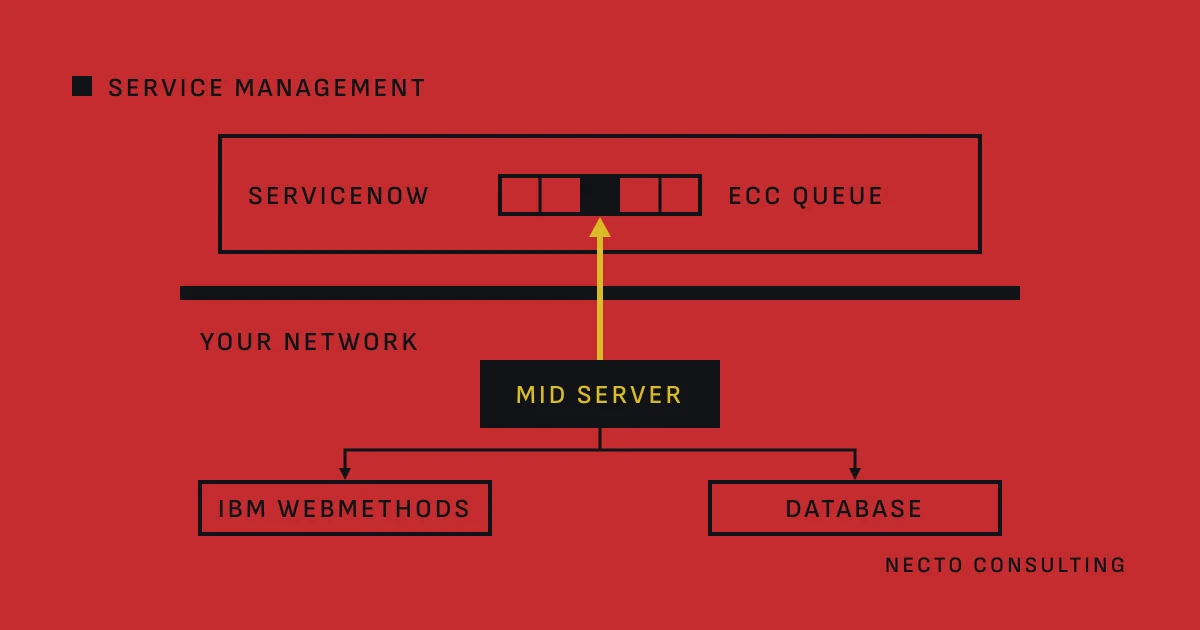
A ServiceNow integration needs a MID Server when the instance has to reach a system inside your network, such as IBM webMethods on your own servers or a database. The MID Server is a Java application on a server in that network. It opens the connection to the instance itself, on port 443, and needs no inbound connection.
What the ServiceNow MID Server is and how it connects
#The MID Server runs as a Windows service or a UNIX daemon, and moves data between the instance and external applications, data sources and services.
It communicates with the instance on port 443 and requires no inbound connection. The firewall rule runs one way: from the MID Server host to instance_name.service-now.com on port 443. A web proxy’s details go into the MID Server’s config.xml file.
Work reaches the MID Server through the ECC (External Communication Channel) queue on the instance:
- The instance saves a job for the MID Server in the ECC queue.
- The MID Server keeps a persistent connection to the instance open through the Asynchronous Message Bus (AMB), which notifies it of the job.
- It also polls the queue at a regular interval, 40 seconds by default (
mid.poll.time), in case that connection drops. - It runs the job inside your network and reports the result back to the ECC queue.
A call through a MID Server is therefore asynchronous. ServiceNow’s SOAPMessageV2 reference says that MID Server requests must go through the ECC queue, an asynchronous queue. For REST, waitForResponse() sets how long the instance waits for the answer.
What a MID Server does in a ServiceNow integration
#Discovery, Service Mapping, Event Management and Integration Hub all use MID Servers. In Discovery, the MID Server runs probes inside your network, and sensors on the instance update the configuration management database (CMDB) with the results. In an integration, it does four jobs.
- Outbound REST and SOAP. A REST message can run from a MID Server to reach REST providers on an internal network. In a script,
setMIDServer()on RESTMessageV2 or SOAPMessageV2 names the MID Server. This is how ServiceNow calls an API that IBM webMethods publishes on your own servers, through API Gateway or Integration Server. - Integration Hub steps. In Workflow Studio, the REST and SOAP steps run on the instance or, with their Use MID option, on a MID Server. The PowerShell and SSH steps run commands on machines in your network through a MID Server. The REST, SOAP and JDBC steps need an Integration Hub subscription.
- SQL against a database. The JDBC step runs only on a MID Server with JDBC capability, one SQL statement per step. By default it allows SELECT, INSERT, UPDATE, DELETE, SHOW and DESCRIBE; the property
mid.property.jdbc_operationsnarrows the list. - Import sets from a database. A JDBC type data source connects through a dedicated MID Server inside your firewall that can reach the database port, or from the instance over a VPN. ServiceNow warns that JDBC calls from the MID Server are never encrypted, and advises limiting the MID Server user’s rights.
Which pattern fits each interface, a call, an event or a process, is the subject of Connecting ServiceNow to your integration layer: three patterns.
When a ServiceNow integration does not need a MID Server
#A MID Server carries the traffic that the instance starts towards your network. Without that traffic, an integration needs none.
- ServiceNow calls an endpoint the internet can reach, such as a SaaS API. Integration steps can run directly on the instance; the steps that integrate with systems in your network run on a MID Server.
- Your systems call ServiceNow. The ServiceNow REST APIs, such as the Table API and the Import Set API, are endpoints on the instance’s own address, under
/api/now/. An integration layer in your network calls them with basic authentication or OAuth, over a connection it opens itself. - An import reaches the database over a VPN. A JDBC data source can then connect from the instance. The JDBC step cannot.
Apart from that VPN case, once one flow has to call into your network, the estate needs a MID Server.
How to size a MID Server host for integrations
#ServiceNow’s system requirements set a minimum:
- CPU: a quad-core processor at 2 GHz or more, for one MID Server running the standard 25 concurrent threads.
- Memory: the MID Server installs with 1 GB of JVM memory; raise it when your product’s suggested memory is higher.
- Java: the installer bundles Java 21.0.7, and the minimum JRE is 17.0.10.
- Host: Windows Server or Linux, physical or virtual. Avoid two MID Servers working at the same time on one host, and avoid sharing the host with other applications.
Integrations count among the standard products, and one MID Server can serve several of them without significantly higher requirements.
MID Server clusters for load balancing and failover
#A cluster groups MID Servers for one of two jobs. A load-balancing cluster spreads work across its members. A fail-over cluster has a configured order: when a member fails, the highest available MID Server in that order takes over. Every member needs the same capabilities.
An Integration Hub step can name a MID Server or a MID cluster. Inside a cluster, the MID Server that runs the step may differ from the one you named.
JDBC data sources are the exception. ServiceNow says they should not be used with MID Server clusters, because a failover can produce duplicate data, and it recommends dedicated, non-clustered MID Servers for them.
How MID Server upgrades follow the ServiceNow instance
#A MID Server upgrades itself to the version of its instance. Every hour it checks with the instance for a different version. After an instance upgrade it downloads the new version from install.service-now.com and upgrades. An automatic pre-upgrade check comes first, and its errors block the upgrade until they are resolved.
Three things follow for an integration:
- The MID Server host must reach install.service-now.com, or someone imports the installer by hand.
- A pinned version, set with
mid.version.overrideormid.pinned.version, stops the automatic upgrade. ServiceNow advises against both: different versions on the MID Server and the instance can cause outages. - When a sub-production instance is upgraded first, its MID Servers upgrade with it, so its integrations meet the new MID Server version before production does.
What to settle before you install a MID Server
#- The host: dedicated, in a network zone that reaches every system it calls.
- The firewall: outbound port 443 to the instance, and from the host to each target’s port, such as 1433 for Microsoft SQL Server, 1521 for Oracle or 3306 for MySQL by default.
- The MID Server user: the narrowest rights each integration needs, above all for JDBC.
- The assignment: which integration uses which MID Server or cluster.
How we design and test ServiceNow integrations with IBM webMethods, Camunda and Java services is on the page ServiceNow integration.
Questions
Does every ServiceNow integration need a MID Server?
No, only an integration in which the instance has to reach a system inside your network needs a MID Server. Calls to endpoints the internet can reach run on the instance, and your own systems call the ServiceNow REST APIs on the instance directly.
Which firewall rules does a MID Server need?
A MID Server needs an outbound connection on port 443 to the instance and no inbound connection. Inside your network it also needs to reach each system it calls, such as port 1433 for Microsoft SQL Server by default.
Can JDBC data sources run on a MID Server cluster?
ServiceNow advises against using JDBC data sources with MID Server clusters, because a failover can produce duplicate data. It recommends dedicated MID Servers outside any cluster for them.
What happens to the MID Server when ServiceNow upgrades the instance?
The MID Server upgrades itself to the instance’s version, after an automatic pre-upgrade check. It downloads the package from install.service-now.com, and ServiceNow advises against pinning an older version, because different versions can cause outages.
Sources
- MID Server, ServiceNow
- Exploring MID Server, ServiceNow
- Prepare network connections for MID Servers, ServiceNow
- MID Server ECC Queue, ServiceNow
- MID Server system requirements, ServiceNow
- Configure a MID Server cluster, ServiceNow
- MID Server upgrades, ServiceNow
- Outbound REST web service, ServiceNow
- RESTMessageV2 - Scoped, Global, ServiceNow
- RESTResponseV2 - Scoped, Global, ServiceNow
- SOAPMessageV2 - Scoped, Global, ServiceNow
- Integration steps, ServiceNow
- REST step, ServiceNow
- SOAP step, ServiceNow
- JDBC step, ServiceNow
- JDBC type data source, ServiceNow
- Horizontal discovery process flow with probes and sensors, ServiceNow
- REST APIs, ServiceNow
- IBM webMethods Integration, IBM
- webMethods API Gateway overview, IBM
